Why your Google Maps rank changes from street to street
When someone searches for a service on Google or Google Maps, the local results depend heavily on where they are. Google’s guide to local ranking names three main factors: relevance to the search, distance from the searcher, and prominence, which includes reviews and how well known the business is.
Distance is the one you cannot change, and it is why checking your rank once, from your shop, tells you very little. You might be first for customers on your street and missing for people two kilometres away. A local rank tracker measures that spread.
How a geo-grid scan works
- 1
Choose a keyword
Enter the search a customer would type, such as "dentist" or "ac repair near me". Run one keyword per scan.
- 2
Choose a radius and language
Pick 5, 10, 15 or 20 km around your business and the language of the search. The form shows how many grid points the radius will produce before you start.
- 3
GMBQrcode searches from every point
Your business location comes from your connected Google Business Profile. GMBQrcode lays a grid of points over the circle, runs the keyword through Google’s Places search from each point, and records where your business appears.
- 4
Read the heatmap
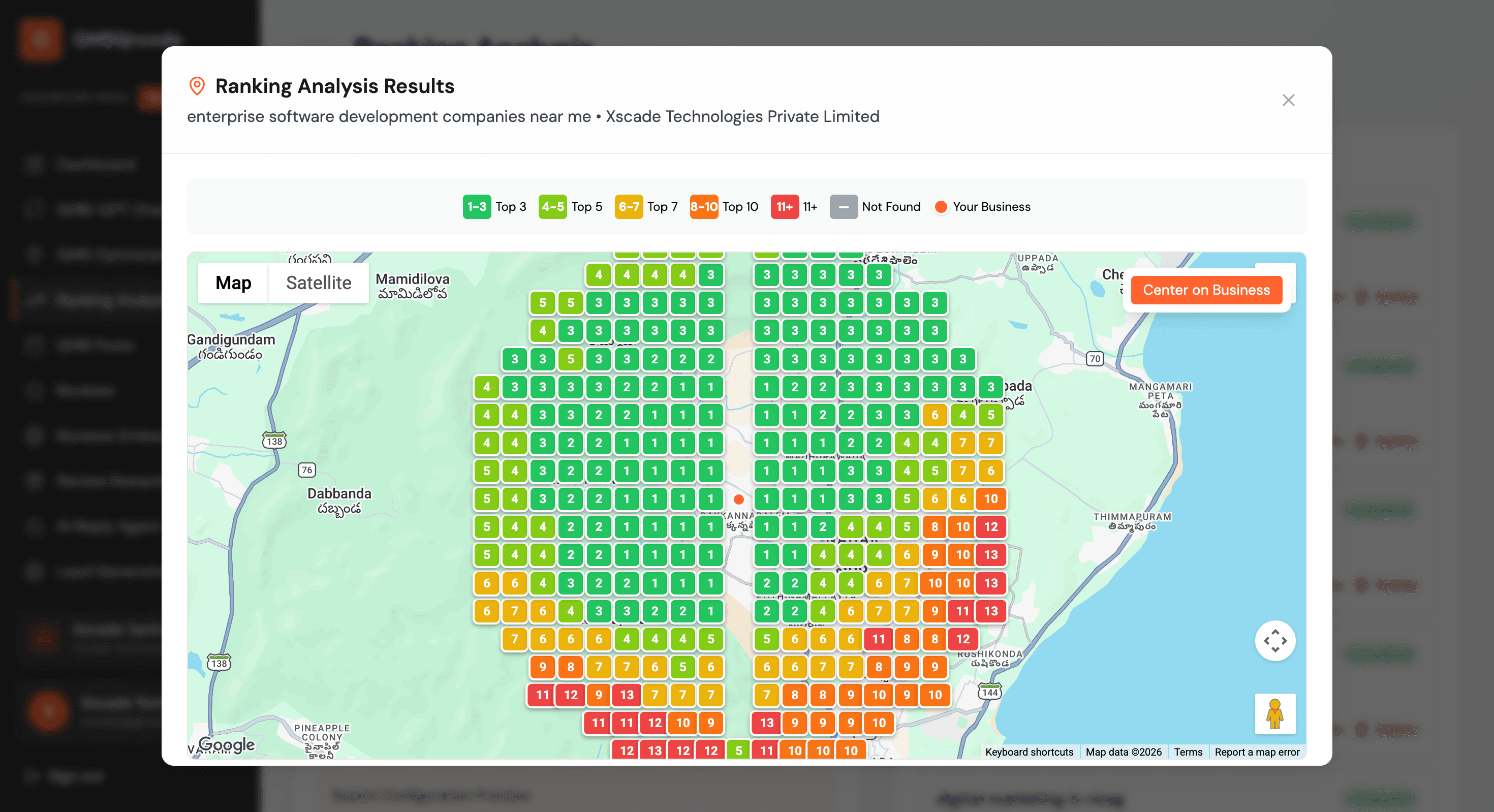
When the scan finishes, each point shows your rank on the map, coloured by position. Summary cards count top 3, top 5 and top 10 points, points where you were not found, and your average rank.
The radius you pick sets how far apart the points are. Larger areas use wider spacing so every scan stays under about 100 points:
| Radius | Spacing | Grid points | Suits |
|---|---|---|---|
| 5 km | 1 km | about 69 | Walk-in shops, cafés, clinics |
| 10 km | about 1.8 km | about 97 | Most service businesses |
| 15 km | about 2.7 km | about 97 | Regional services, B2B |
| 20 km | about 3.5 km | about 97 | Wide catchment areas |
How to read a local SEO heatmap
Every point on the map carries your rank from that spot, in one of these colours:
- 1 to 3. In the top three. People searching here are likely to see you.
- 4 to 5. Close to the top. Often visible after one scroll.
- 6 to 7. On the first screen of a longer list, below several competitors.
- 8 to 10. Present, but most searchers choose before reaching you.
- 11 and lower. Rarely seen from this spot.
- Not found. Not in the first page of results at this point.
Look at the shape, not single squares. A healthy profile is green near the business and fades gradually. A sharp edge where green turns red tells you how far your reach goes. Red or grey right next to your address usually means a relevance problem, not distance: Google does not connect your profile strongly with that keyword.
Click any point for its details, or open the table of all grid points to sort through them.
What to do with the results
- Weak close to home: check that your primary category, services and description use the words customers search with. The free profile strength checker shows gaps.
- Strong close, weak further out: prominence is the lever. More recent reviews and replies to them help, so make asking every customer for a review a habit. A Google review QR code at the counter makes that easy.
- Patchy everywhere: keep the profile active with regular posts and photos. The post scheduler handles posting on the Elite plan.
- Measure again: rerun the same keyword and radius after a few weeks and compare it with the earlier scan in your history.
Plan and price
The local rank tracker is part of the Pro and Elite plans. Pro: ₹449 a month or ₹4,310 a year. Elite: ₹1,249 a month or ₹11,990 a year. Prices for other currencies are on the pricing page.